
Compose files and platform rules
A stack’s Advanced tab holds the compose file (docker-compose.yml) and the variables (.env) as text. That is where you change what the template form does not know: an extra service, another image, an extra domain name.
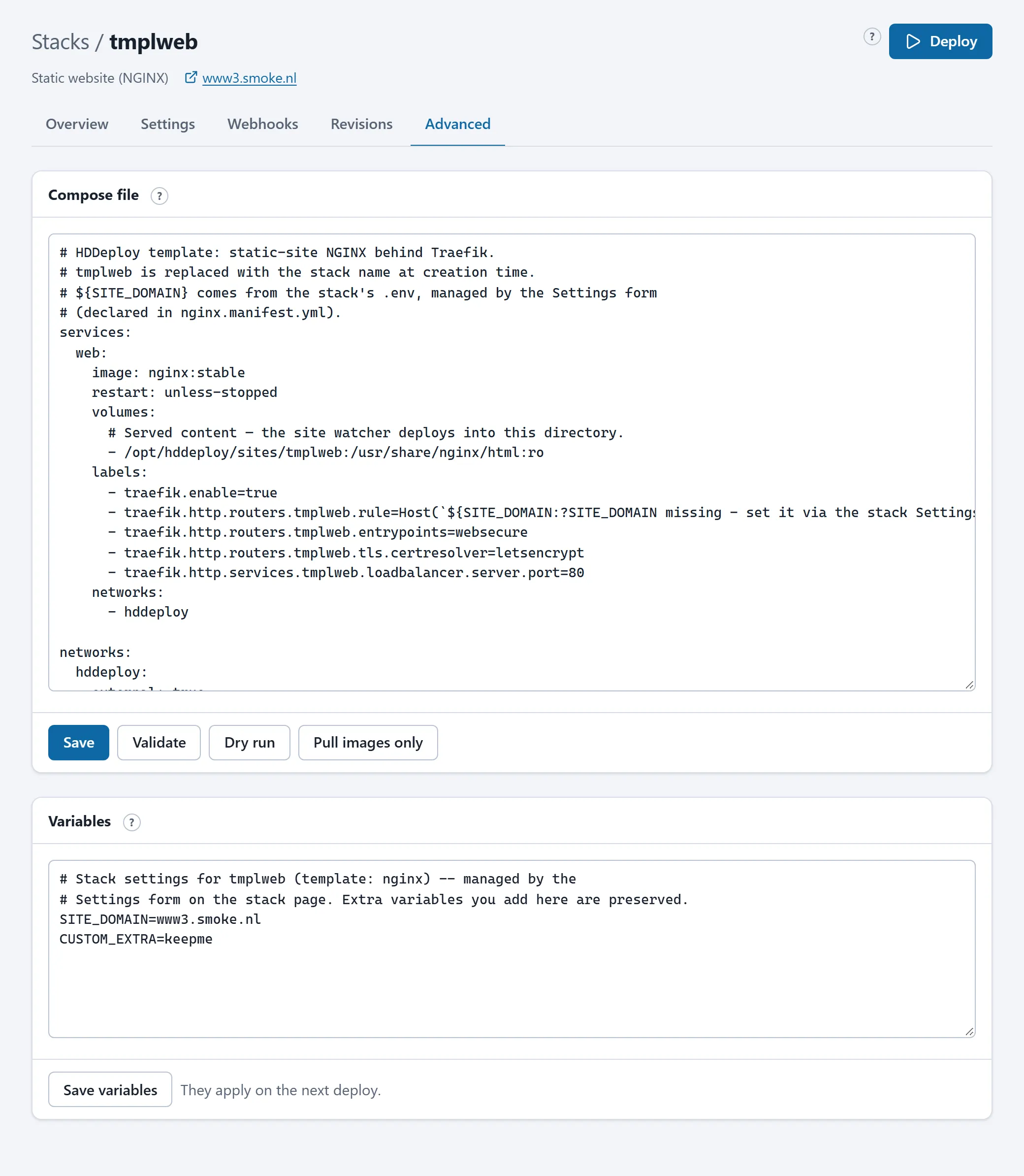
Save, validate, dry run
Section titled “Save, validate, dry run”- Save checks the file and keeps it as a new revision. Nothing changes in what runs until you press Deploy.
- Validate checks without saving: YAML syntax, the compose schema and the platform rules, with your variables filled in.
- Dry run saves and simulates the deploy without changing anything.
- Pull images only saves and pulls the images ahead of time without restarting.
A refused file names every broken rule; nothing is saved then.
Variables
Section titled “Variables”The .env file holds KEY=value lines; the compose file refers to them as ${KEY}. For a stack from a template, the lines belonging to the form are managed by the form; extra lines you add yourself are kept. A variable only reaches a container when the compose file passes it on (under environment:).
The platform rules
Section titled “The platform rules”Every compose file is checked when it is saved, whoever saves it (technicians and assistants included). The rules keep the server safe and the stacks separated from each other:
| Not allowed | Why |
|---|---|
privileged, cap_add, devices, security_opt, sysctls, userns_mode, pid, ipc, cgroup, a custom runtime |
Give a container rights on the server itself. |
network_mode: host or another container’s network, volumes_from |
Break the separation between stacks. |
| Mounting the Docker socket | Is root on the server. |
Bind mounts outside the stack’s directory (except /opt/hddeploy/sites/{stack}), the whole stack directory, or the git checkout |
A container may only see its own files. Build an image from the checkout instead of mounting it. |
ports: (ports directly to the outside) |
All traffic goes through the web gateway, which handles HTTPS and the access lists. Only a technician can allow this per stack. |
build: with a context other than ./source, additional build contexts, a Dockerfile outside the context |
Building happens from the managed source. |
External networks other than hddeploy, external volumes, volumes with driver_opts |
Can reach other stacks or arbitrary paths. |
include and extends |
Everything a stack runs is in its own file. |
| A Traefik router that claims the portal’s name | Would make the portal unreachable. |
If your application genuinely needs something from this list, ask HD Services. A technician can allow “WAN ports” per stack or set an exemption from the rules; that is recorded.
Making a service reachable through the web gateway
Section titled “Making a service reachable through the web gateway”A service becomes reachable on a domain name with Traefik labels. The pattern from the templates:
services:  web:    image: nginx:stable    restart: unless-stopped    labels:      - traefik.enable=true      - traefik.http.routers.myapp.rule=Host(`www.example.com`)      - traefik.http.routers.myapp.entrypoints=websecure      - traefik.http.routers.myapp.tls.certresolver=letsencrypt      - traefik.http.services.myapp.loadbalancer.server.port=80    networks:      - hddeploy
networks: hddeploy: external: trueHost(...)may hold several names:Host(`www.example.com`) || Host(`example.com`). Every name needs a DNS A record; the certificate comes by itself.loadbalancer.server.portis the port the container itself listens on.- When a service is attached to more than one network (an internal network with the database, for example), add
traefik.docker.network=hddeploy, otherwise the gateway sometimes picks the wrong network and requests hang. - Forward a path instead of a whole host:
Host(`www.example.com`) && PathPrefix(`/api`).
One-off tasks
Section titled “One-off tasks”A container that performs one task and then stops (a database migration, creating directories) should have restart: "no", be idempotent, exit with code 0 when the work is already done and with another code on a real failure. The portal recognises such containers as “Finished” or “Failed” and does not count them as stopped services.
:latest
Section titled “:latest”An image without a fixed version (:latest) changes silently on every deploy. Use a version, or switch Nightly update on so it happens deliberately every night.