
Uploading files
A static website no longer has to arrive through an FTP location, and an application built on the server does not need a GitHub repository. Your assistant or your script puts the files on the server directly.
Websites
Section titled “Websites”Draft and publish
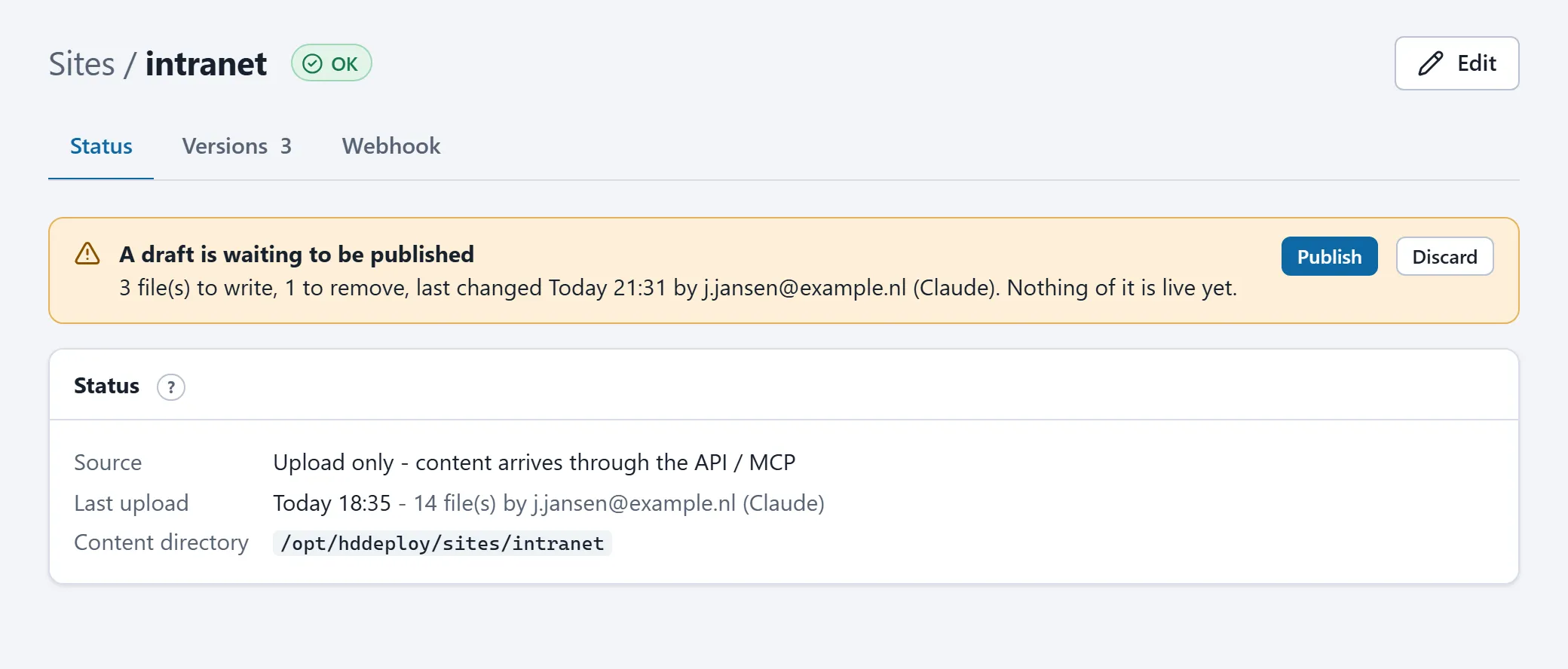
Section titled “Draft and publish”- The assistant writes files into a draft first (tool
write_site_files, APIPUT /sites/{site}/draft/files). Nothing of it is visible yet. - Publishing (
publish_site_draft,POST /sites/{site}/draft/publish) makes the draft live in one step. For a small change the assistant can write and publish in one call (publish: true). - Before every publish the current version is archived.
restore_site_version(or the Versions tab on the site’s page) puts it back. Draft publishes within ten minutes share one archive, so an assistant working file by file does not push the pre-session version out of the list. - In the portal, the site’s page shows whether a draft is pending, with buttons to publish or discard it.
A complete site as an archive
Section titled “A complete site as an archive”upload_site_archive takes a tar.gz or zip of at most 8 MB (base64). Larger sites go through the REST API, without that limit:
tar -czf site.tar.gz -C ./dist .curl -X PUT -H "Authorization: Bearer hdd_..." -H "Content-Type: application/gzip" \ --data-binary @site.tar.gz \ "https://<your-server>.hddeploy3000.nl/api/v1/sites/mysite/content"Options: ?mode=replace (default, replaces the whole content like a sync) or ?mode=merge (files not in the archive stay), and ?stripRoot=true to drop a single top-level folder from the archive. The archive may be application/gzip, application/zip or application/octet-stream; in the last case the server detects the format itself.
Upload only or combined
Section titled “Upload only or combined”A site that is already synced through FTP can receive uploads too. Mind: a sync replaces the whole directory, so at the next change on the FTP location uploaded files disappear. If you only want to upload, choose upload only for the site (or let the assistant use create_upload_site; API PUT /sites/{site}). Such a site has no source and is never checked.
Reading files
Section titled “Reading files”list_site_files and get_site_file (API GET /sites/{site}/files and GET /sites/{site}/file?path=) read the live content, up to 2 MB per file. Text comes as text, binary files as base64.
An application’s source code
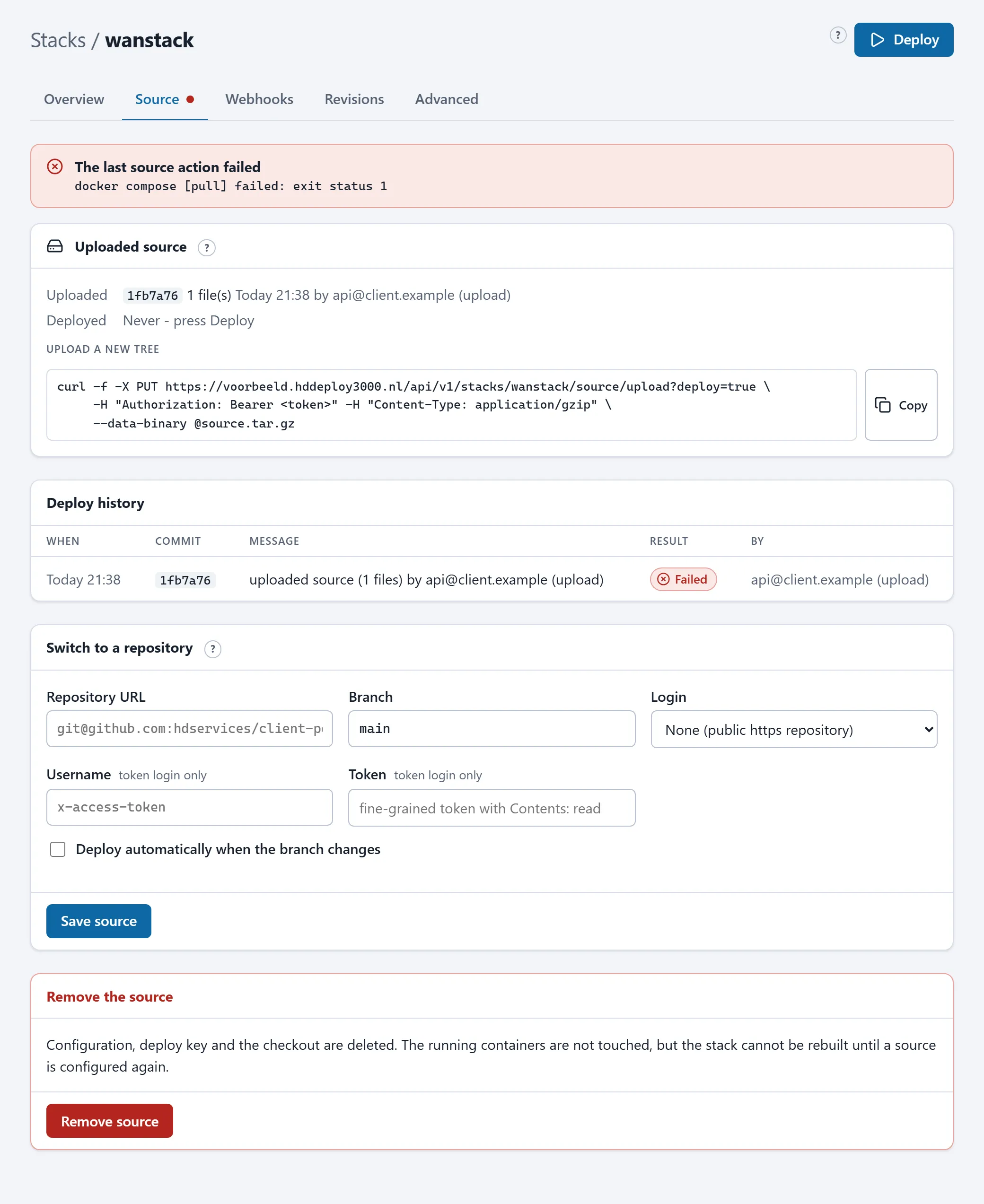
Section titled “An application’s source code”For a stack built on the server (with a Dockerfile), upload_stack_source replaces the source tree with an uploaded archive; deploy_stack then builds the new version. Larger projects go through the API:
tar -czf app.tar.gz -C ./my-app .curl -X PUT -H "Authorization: Bearer hdd_..." -H "Content-Type: application/gzip" \ --data-binary @app.tar.gz \ "https://<your-server>.hddeploy3000.nl/api/v1/stacks/myapp/source/upload?deploy=true"?deploy=truequeues the build right away.- A stack that still builds from a GitHub repository switches to uploads this way; the repository’s deploy key and webhook are removed. Going back to a repository is always possible on the Source tab.
- The Source tab shows which upload is deployed (the first 40 characters of the checksum stand where the commit would be), when and by whom.
Limits and rules
Section titled “Limits and rules”| Maximum size per upload or draft | 1 GB for sites, 512 MB for source code (unpacked); 413 above that |
| Files per draft write | 200 |
| Archive through an MCP tool | 8 MB (base64); larger through the API |
| Reading a file | at most 2 MB |
| Archive contents | regular files and directories only; symbolic links, devices and paths with .. are refused (422) |
| Rate limit | uploads do not count towards the 120 requests per minute |
An interrupted upload leaves nothing behind: the server unpacks to a temporary place first and replaces the content only when everything is fine.